Oké. In mijn vorige artikeltje heb ik een uitstapje gemaakt naar het inzetten van een supercap om spanningsdips richting de ESP-module op te vangen.
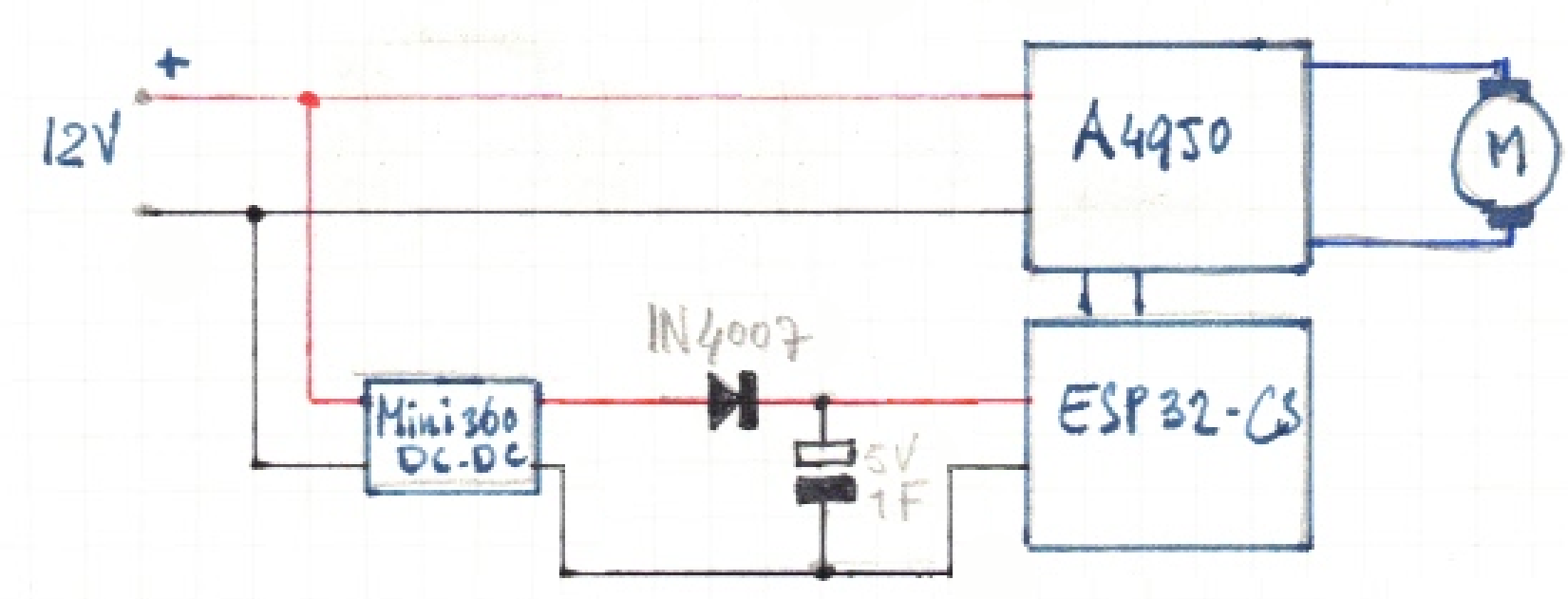
Hierboven nog een keer het schema hoe de supercap in het geheel ingezet zou moeten/kunnen worden.
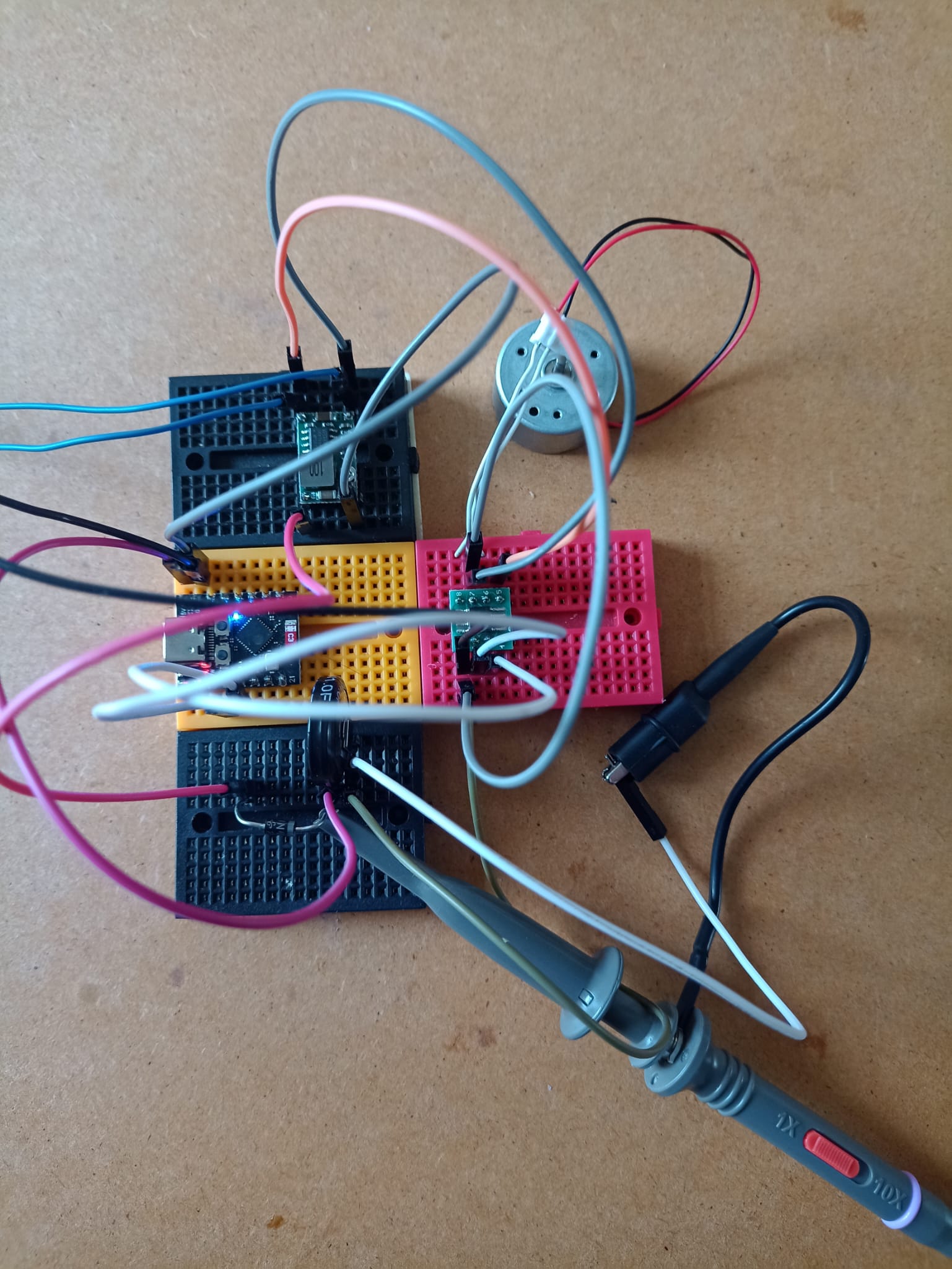
Nog even terug: waarom was die spanningsdip ook alweer een probleem? Nou, wanneer de ESP-module start (wanneer de spanning erop gezet wordt) wordt de webserver die erop draait (zie de code hieronder) ook gestart. Wanneer de spanning tijdens een dip wegvalt en weer terugkomt wordt de ESP feitelijk gereset en wordt de webserver dus gestopt en weer opgestart. Dat kost tijd, maar belangrijker: de ESP heeft geen idee meer waarmee ie bezig was! Richting en snelheid worden gereset: de trein staat stil. Die spanningsdip hoeft maar een fractie van een seconde aan te houden om dit probleem te veroorzaken.
In de testopstelling (hierboven) zorgt de supercap er inderdaad voor dat de ESP bij het tijdelijk wegvallen van de spanning blijft ‘leven’. Zelfs een dip van meerdere seconden (dit zal in de praktijk niet voorkomen) zal opgevangen worden.
#include <WiFi.h>

// Replace with your network credentials
const char *ssid = "IthurtswhenIP_2.4";
const char *password = "xxxxxxxxxxx"; // in te vullen

// Set web server port number to 80
WiFiServer server(80);

// Variable to store the HTTP request
String header;
int snelheid;
int ist_snelheid;

// Auxiliar variables to store the current output state
String richtingStatus = "uit";
String ist_richtingStatus = "Vooruit";;

// the number of the motor pin
const int motorPin1 = 9;  // motor aansluiting 1
const int motorPin2 = 8;  // motor aansluiting 2

// setting PWM properties
const int freq = 200;          // was 4000
const int ledChannel1 = 1;       // was 0; er zijn 16 channels: 0 - 15
const int ledChannel2 = 4;       // was 0; er zijn 16 channels: 0 - 15
const int resolution = 8;       // was 8: waarde 0 - 255; van 1 tot 16

void setup() {

  // configure motor PWM functionalitites
  ledcSetup(ledChannel1, freq, resolution);
  ledcSetup(ledChannel2, freq, resolution);

  // attach the channel to the GPIO to be controlled
  ledcAttachPin(motorPin1, ledChannel1);
  ledcAttachPin(motorPin2, ledChannel2);

  Serial.begin(115200);
  Serial.println("Loc_besturing_ESP_C3_MotorControl_WiFi_test_4.ino");

  // Connect to Wi-Fi network with SSID and password
  Serial.print("Connecting to ");
  Serial.println(ssid);
  WiFi.begin(ssid, password);
  while (WiFi.status() != WL_CONNECTED) {
    Serial.print("WL not connected, trying again...");
    WiFi.begin(ssid, password);
    delay(1000);
    //delay(500);
    Serial.print(".");
  }
  // Print local IP address and start web server
  Serial.println("");
  Serial.println("WiFi connected.");
  Serial.print("IP address: ");
  Serial.println(WiFi.localIP());
  server.begin();
}

void loop(){
  WiFiClient client = server.available();   // Listen for incoming clients

  if (client) {                             // If a new client connects,
//    Serial.println("New Client.");          // print a message out in the serial port
    String currentLine = "";                // make a String to hold incoming data from the client
    while (client.connected()) {            // loop while the client's connected
      if (client.available()) {             // if there's bytes to read from the client,
        char c = client.read();             // read a byte, then
        Serial.write(c);                    // print it out the serial monitor
        header += c;
        if (c == '\n') {                    // if the byte is a newline character
          // if the current line is blank, you got two newline characters in a row.
          // that's the end of the client HTTP request, so send a response:
          if (currentLine.length() == 0) {
            // HTTP headers always start with a response code (e.g. HTTP/1.1 200 OK)
            // and a content-type so the client knows what's coming, then a blank line:
            client.println("HTTP/1.1 200 OK");
            client.println("Content-type:text/html");
            client.println("Connection: close");
            client.println();

            // turns the GPIOs on and off
            if (header.indexOf("GET /1/on") >= 0) {
              richtingStatus = "Vooruit";
            } else if (header.indexOf("GET /1/off") >= 0) {
              richtingStatus = "Achteruit";
            }

            if (header.indexOf("GET /10") >= 0) {
              snelheid = 10;
            }
            if (header.indexOf("GET /20") >= 0) {
              snelheid = 20;
            }
            if (header.indexOf("GET /30") >= 0) {
              snelheid = 30;
            }
            if (header.indexOf("GET /40") >= 0) {
              snelheid = 40;
            }
            if (header.indexOf("GET /50") >= 0) {
              snelheid = 50;
            }
            if (header.indexOf("GET /60") >= 0) {
              snelheid = 60;
            }
            if (header.indexOf("GET /70") >= 0) {
              snelheid = 70;
            }
            if (header.indexOf("GET /80") >= 0) {
              snelheid = 80;
            }
            if (header.indexOf("GET /90") >= 0) {
              snelheid = 90;
            }
            if (header.indexOf("GET /100") >= 0) {
              snelheid = 100;
            }
            if (header.indexOf("GET /110") >= 0) {
              snelheid = 110;
            }
            if (header.indexOf("GET /120") >= 0) {
              snelheid = 120;
            }

            if (header.indexOf("GET /STOP") >= 0) {
              snelheid = 0;
            }

            // Bij wisseling van rijrichting
            if (richtingStatus == "Vooruit" && ist_richtingStatus == "Achteruit") {
              snelheid = 0;
              achteruit_afremmen();
              ist_richtingStatus = richtingStatus;
            }
            if (richtingStatus == "Achteruit" && ist_richtingStatus == "Vooruit") {
              snelheid = 0;
              vooruit_afremmen();
              ist_richtingStatus = richtingStatus;
            }


            // Vooruit of achteruit afhankelijk van richtingStatus
            if ((ist_richtingStatus) == "Vooruit") {
              if ((snelheid) >= (ist_snelheid)){
                vooruit_optrekken();
              } else if ((snelheid) <= (ist_snelheid)){
                vooruit_afremmen();
              }
            }
            if ((ist_richtingStatus) == "Achteruit") {
              if ((snelheid) >= (ist_snelheid)){
                achteruit_optrekken();
              } else if ((snelheid) <= (ist_snelheid)){
                achteruit_afremmen();
              }
            }


            // Display the HTML web page
            client.println("<!DOCTYPE html><html>");
            client.println("<head><meta name=\"viewport\" content=\"width=device-width, initial-scale=1\">");
            client.println("<link rel=\"icon\" href=\"data:,\">");
            // CSS to style the on/off buttons
            // Feel free to change the background-color and font-size attributes to fit your preferences
            client.println("<style>html { font-family: Helvetica; display: inline-block; margin: 0px auto; text-align: center;}");

            client.println(".button { background-color: #196A5B; border: none; color: white; padding: 16px 40px;");
            client.println("text-decoration: none; font-size: 18px; margin: 2px; cursor: pointer;}");
            client.println(".button2 {background-color: #196A5B;}</style></head>");

            // Web Page Heading
            client.println("<body><h1>Locomotief 1</h1>");
            client.println(WiFi.localIP());

            // Display current state, and ON/OFF buttons for motorPin1
            //client.println("<p>Richting is " + richtingStatus + "</p>");
            //client.println("<p>Snelheid is " + ist_snelheid + "</p>");


            //client.println("<p>motorPin2State is " + motorPin2State + "</p>");

            client.print("<p><a href=\"/10\"><button class=\"button button3\">10</button></a>");
            client.print("<a href=\"/20\"><button class=\"button button3\">20</button></a>");
            client.print("<a href=\"/30\"><button class=\"button button3\">30</button></a>");
            client.print("<a href=\"/40\"><button class=\"button button3\">40</button></a></p>");

            client.print("<p><a href=\"/50\"><button class=\"button button3\">50</button></a>");
            client.print("<a href=\"/60\"><button class=\"button button3\">60</button></a>");
            client.print("<a href=\"/70\"><button class=\"button button3\">70</button></a>");
            client.print("<a href=\"/80\"><button class=\"button button3\">80</button></a></p>");

            client.print("<p><a href=\"/90\"><button class=\"button button3\">90</button></a>");
            client.print("<a href=\"/100\"><button class=\"button button3\">100</button></a>");
            client.print("<a href=\"/110\"><button class=\"button button3\">110</button></a>");
            client.print("<a href=\"/120\"><button class=\"button button3\">120</button></a></p>");

            client.print("<p><a href=\"/STOP\"><button class=\"button button3\">STOP</button></a></p>");

            // Wanneer richtingStatus is Vooruit, toon Achteruit in button
            if (richtingStatus=="Achteruit") {
              client.println("<p><a href=\"/1/on\"><button class=\"button\">Vooruit</button></a></p>");
            } else {
              client.println("<p><a href=\"/1/off\"><button class=\"button button2\">Achteruit</button></a></p>");
            }
            client.println("</body></html>");

            // The HTTP response ends with another blank line
            client.println();
            // Break out of the while loop
            break;
          } else { // if you got a newline, then clear currentLine
            currentLine = "";
          }
        } else if (c != '\r') {  // if you got anything else but a carriage return character,
          currentLine += c;      // add it to the end of the currentLine
        }
      }
    }
    // Clear the header variable
    header = "";
    // Close the connection
    client.stop();
    Serial.println("Client disconnected.");
    Serial.println("");
  }
}
Wat raar is, is dat een eerder gemaakt programma (“Loc_besturing_ESP_C3_MotorControl_WiFi_test_4.ino”) opeens problemen gaf om de verbinding met het WiFi-netwerk op te bouwen. Blijkbaar lukt het (nu?) opeens alleen maar het een 2,4GHz netwerk! Waarom? Geen idee.
  while (WiFi.status() != WL_CONNECTED) {
    Serial.print("WL not connected, trying again...");
    WiFi.begin(ssid, password);
    delay(1000);
    //delay(500);
    Serial.print(".");
De ESP32 heeft soms wat moeite met het opzetten van de WiFi-verbinding. Met bovenstaande regels (2 t/m 4) toegevoegd wordt er net zolang geprobeerd totdat het is gelukt.
WiFi connected.
IP address: 192.168.2.102
De ESP krijgt keurig een IP-adres van de DHCP. En de webserver werkt prima!
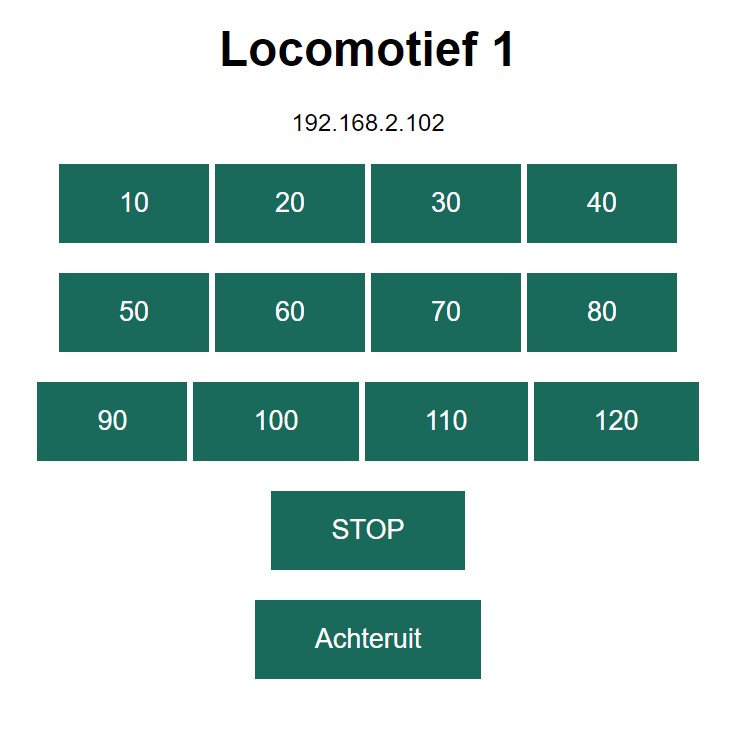
Ook de motorsturing werkt goed! Versnellen, vertragen. Stoppen en van richting veranderen! Het werkt gewoon allemaal.
Tijd om e.e.a. in het locje “in te bouwen”.